Announcing “dynamic” donation amounts: Making giving smarter and more impactful

.svg)
.svg)
.svg)
.svg)

We are thrilled to announce the launch of new ways to customize the default donation amounts on Give Lively-powered donation. They add new adaptability to how your nonprofit engages with donors. This flexibility helps drive higher conversion rates and larger average gifts.
What “dynamic” donation amounts do
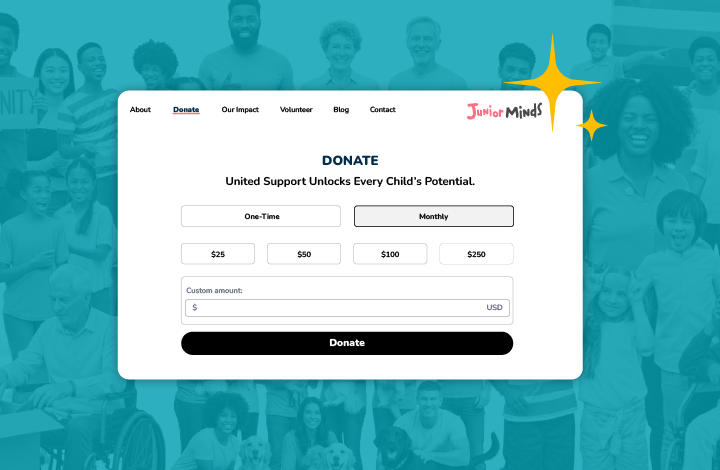
“Dynamic” donation amounts enhance the existing "Donation Amounts and Impact Stories" functionality of your Core Profile and Campaign Pages by allowing suggested giving levels based on a donor's payment frequency – currently one-time or monthly.
Optimize for frequency
Supporters willing to commit to a recurring donation might have a different giving capacity than one-time donors. You can now set different suggested amounts for recurring gifts to encourage long-term commitment, versus one-time suggested amounts set to meet more immediate needs.
You can also choose which donation frequencies appear with a campaign – currently one-time and/or monthly, with more recurring cadences to come.
Target impact storytelling
You have always been able to craft specific impact stories for each donation amount, but now you can also tell entirely different stories in different donation frequencies, even for the same amount. For instance, a one-time $100 donation might "Fund a day of shelter," while a $100 monthly donation could "Provide ongoing support for a child's education."
You are also able to hide the “custom” donation field to keep the focus on your default amounts.
Increase conversions
Relevant and frequency-appropriate suggested amounts reduce friction in the giving process, leading to higher conversion rates and larger overall donation tallies.
How to implement “dynamic” donation amounts
The new functionality is now integrated into the "Donation Amounts and Impact Stories" section of your Core Profile or any Campaign Page within the Nonprofit Admin Portal.

This section allows you to:
- Set your own custom donation amounts (replacing the default $25, $50, $100 and $250).
- Optionally add an image (1200x780px recommended) and/or impact story (75 characters recommended) for each suggested donation amount.
- Control the visibility of frequencies and sort order of donations via the "Sorting & Frequencies" tool.
Pro tip 1: Donation amounts apply to only one frequency
When editing existing suggested amounts or creating new ones, you can now specify the amount and impact story for one-time and monthly payment frequencies independently. Ensure you have a tailored story for both the one-time and monthly frequency of a specific amount, if you keep it for both.
Pro tip 2: Use powerful language
Remember the recommended length for an impact story is 75 characters. Use active verbs and practical examples to maximize the emotional appeal, such as: "Feeds four children for a week" for a specific amount.
Why “dynamic” donation amounts matter
For years, Give Lively has empowered nonprofits to set their own suggested donation amounts and bring them to life through compelling impact stories and images that illustrate the positive change a contribution makes.
As outlined in our Core Profile setup guide: When supporters are passionate about a cause and understand the impact of each donated dollar, they feel more compelled to give. Impact stories showcase the strength of your nonprofit’s work.
Now, with “dynamic” donation amounts, you can refine this strategy even further, which helps in a tricky economy like today’s when deepening connections with donors is critical. It’s about building trust and communicating the value of long-term support.
By leveraging “dynamic” donation amounts, your nonprofit can create a more personalized and compelling giving experience, reinforcing the value of both immediate support and sustained commitment. Log in to your Nonprofit Admin Portal today to update your donation amounts and maximize your impact.
%201.svg)